

Thunderbird is a nice email client software for managing your email. You can setup a cPanel email account with Mozilla Thunderbird and receive/send email. **
1.** Open Mozilla Thunderbird.

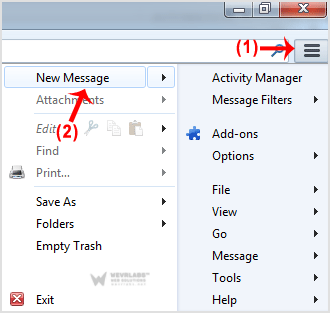
2. Click on the Menu Icon located on right side of the screen and then go to "New Message". A drop box will open.
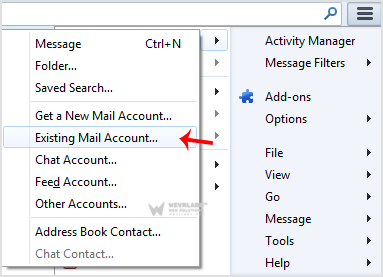
3. Now Click on the "Existing Mail Account".
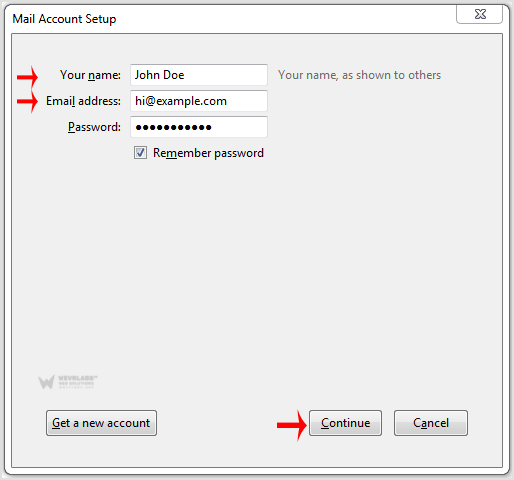
4. In Mail Setup Account, fill out your name, full email address like "[email protected]", and the password of your email account. Then click on "Continue".
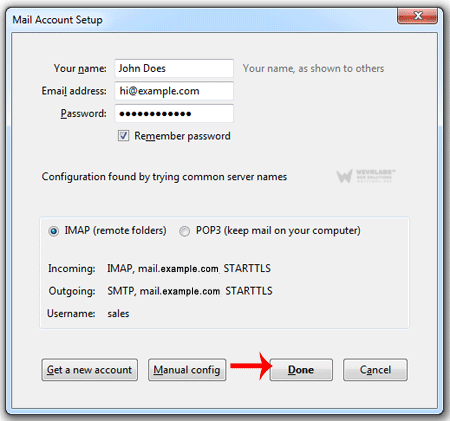
5. It can take a few minutes to configure your email account so be patient. Once it is done, you will need to click on "**Done".
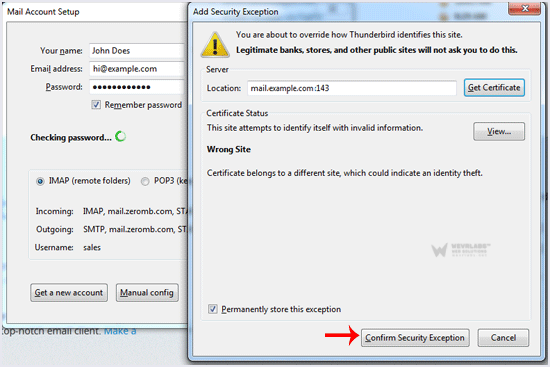
6.** If it shows a SSL Security exception, then click on the** "Confirm Security Exception**" button and the warning will disappear within few minutes. **
**Congratulations, Your email is setup up successfully. Now, you can manage your email through Mozilla Thunderbird.