

1. Log into your cPanel account.
2. In the "Databases" section, click on "phpMyAdmin" Icon.

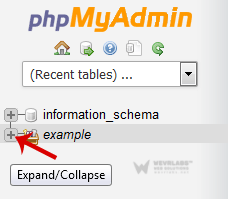
3. In left side-bar, Click on the expand button to expand database like "example".
** **
** **
** **
** **
** **
4. Under your cPanel username, you can see list of all databases. Select appropriate database in which you want to import SQL.
**
-
Click on the "Import" button.

-
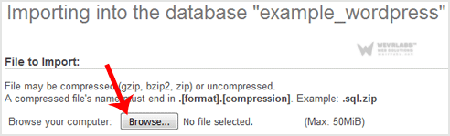
Under "File to Import" click on the "Browse" button, Select SQL file from your PC.
7.** Scroll down and then click on the** "Go**" button.**
If its show a message in green box then it means your SQL is successfully uploaded.
 **
**