

If you want to increase/decrease the FTP Quota or to use an "Unlimited" FTP Quota but also want to set a limit, then follow these steps to modify the FTP User quota.
1. Log into your cPanel account.
2. In the "Files" section, click on "FTP Accounts" Icon.
 **
3.** Under the "FTP Accounts" list, click on "Change Quota".
**
3.** Under the "FTP Accounts" list, click on "Change Quota".
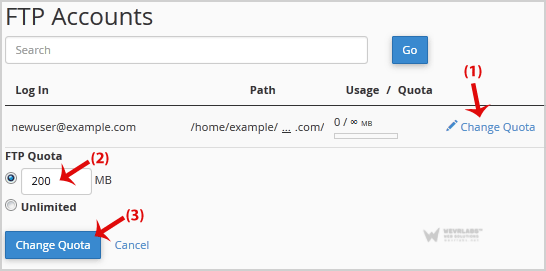
4. Click on the "Change Quota" button.