

1. Log into your SiteWorx account. (e.g.: www.example.com:2443/siteworx/ )
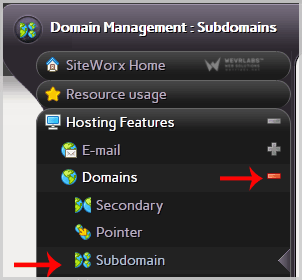
2. Under "SiteWorx Menu", click the "Hosting Features" menu item if it is not already open.
3. Click the "Domain" menu item and then choose the "Subdomain" option.
4. Select the appropriate domain name you wish to delete under the "Existing Domains" tab.
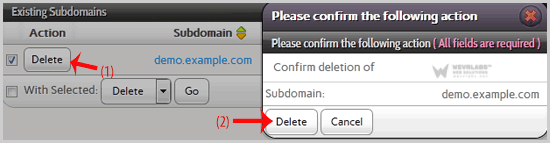
5. Click the "Delete" button.
6. A conformation window will appear. Click again on the "Delete" button.
You should see a success message popping up, notifying you that your subdomain has been removed.