
1. Log into your cPanel account.
2. In the "Software" section, click on "Softaculous Apps Installer" Icon.

3. cPanel will open a Softaculous Interface.
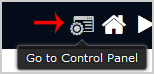
If you want to go back to cPanel, click on the "Go Back to Control Panel" icon.

Staff
Last updated on May 29, 2026
1. Log into your cPanel account.
2. In the "Software" section, click on "Softaculous Apps Installer" Icon.
3. cPanel will open a Softaculous Interface.
If you want to go back to cPanel, click on the "Go Back to Control Panel" icon.